Cashflow
Understand how to track planned and actual spending over time, helping you monitor budgets and forecast future costs.
- Overview
- Interests
- Fees and charges
- Planned expenses
- Contributions
- Adjust contributions
- Change Opening balance
Overview
The Cashflow Page displays a complete overview of your maintenance fund over the next 30 years.
It helps you track the health of your fund, see projected balances, and plan contributions to ensure your maintenance activities are always covered.
The page shows the data in two ways:
-
A chart to visualise trends over time.
-
A table showing detailed numbers for each year.
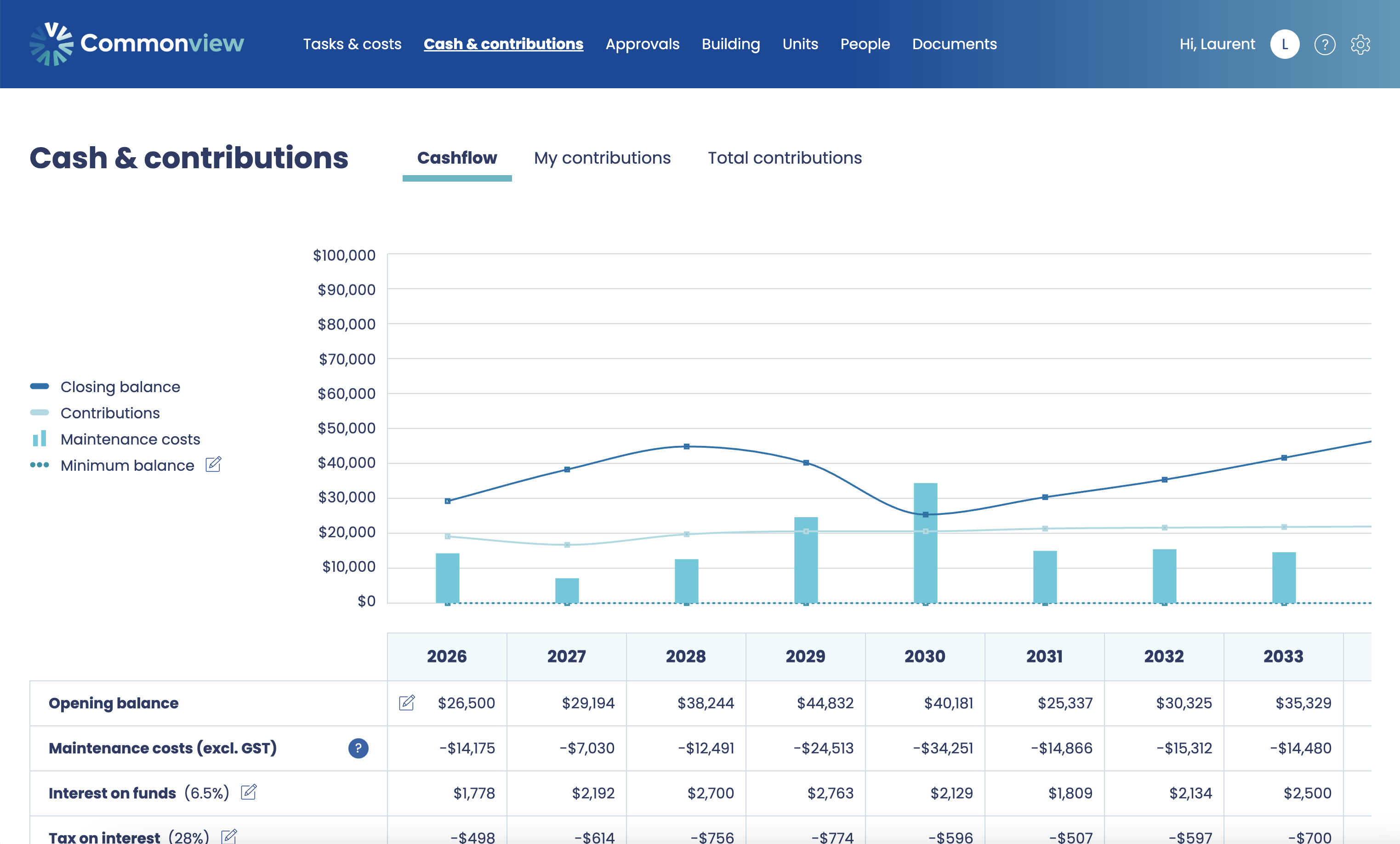
Table layout
The table columns represent years (aligned with your financial year settings).
The rows represent the main components of your fund:
-
Opening Balance – the balance at the start of the year
-
Interest on Funds – interest earned on the opening balance
-
Tax on Interest – corporate tax applied to interest earned
-
Fees and Charges – bank fees or administrative charges
-
Planned Expenses – projected maintenance costs for the year
-
Contribution Adjustments – manual adjustments to contributions, if any
-
Contributions – funds added to cover planned expenses
-
Closing Balance – the balance at the end of the year
How contributions are calculated
The contributions row is calculated based on the provisions (accruals) from planned expenses and other factors.
-
Start with accruals – the total amount needed for planned expenses in a given year.
-
Adjust for fund earnings and charges:
-
Subtract net interest (interest earned minus taxes)
-
Add fees and charges
-
Add any contribution adjustments
-
This gives the required contribution for that year.
Contributions = (Interest on Funds − Tax on Interest) + Fees and Charges + Contribution Adjustments
How the closing balance is calculated
Closing Balance = Opening Balance − Planned Expenses + Contributions
This ensures that your fund always has enough to cover planned maintenance while taking into account interest, taxes, fees, and adjustments.
Notes
-
The Cashflow Page does not show accruals directly — it only shows the resulting contributions.
-
The chart provides a visual overview of opening and closing balances, helping you quickly identify potential shortfalls or surpluses.
-
All numbers are projected based on your current settings, including inflation, interest rate, tax rate, and forecast opening balance.
Interests
The Interest on Funds row shows the income your maintenance fund earns from the money held in the account.
It is based on the average balance of the fund during the year, reflecting a realistic estimate of the interest earned over time.
How it’s calculated
-
Average balance: The system calculates the average of the opening balance and the closing balance for the year.
-
Interest rate on funds: The average balance is multiplied by the interest rate you set in the settings.
-
Corporate tax rate: Tax is deducted from the interest earned, leaving the net interest that actually contributes to your fund.
Formula (simplified):
Net Interest = (Opening Balance + Closing Balance) ÷2 × Interest Rate × (1 − Corporate Tax Rate)
Net interest
-
Gross interest – the total interest earned before taxes
-
Tax on interest – the corporate tax applied to interest
-
Net interest – the remaining interest after taxes, which increases your fund’s available balance
This ensures your cashflow projections reflect the real growth of your fund, not just the theoretical interest.
Example
| Item | Amount |
|---|---|
| Opening Balance | $50,000 |
| Closing Balance | $52,000 |
| Average Balance | $51,000 |
| Interest Rate | 2% |
| Gross Interest | $1,020 |
| Tax (28%) | $285.60 |
| Net Interest | $734.40 |
-
The $734.40 is the net amount added to the fund for the year.
-
This value is then used when calculating contributions and closing balances.
Fees and charges
The Fees and Charges row shows any bank fees, administrative costs, or other charges related to managing your maintenance fund.
These costs are subtracted from the fund.
How it works
-
Fees and charges are entered manually.
-
They are applied once per year and appear in the cashflow table for the corresponding financial year.
-
These amounts do not affect planned expenses — they are separate costs associated with managing the fund.
Impact on cashflow
Fees and charges are considered when calculating contributions:
Contributions = Accruals − Net Interest + Fees and Charges + Contribution Adjustments
-
Adding fees increases the contributions needed to maintain the fund.
-
This ensures your fund balance stays sufficient to cover all planned expenses, even after management costs.
Planned expenses
The Planned Expenses row shows the total of all maintenance costs scheduled for a given year.
It represents the sum of all tasks, including repairs, servicing, and end-of-life replacements that are due within that financial year.
How it works
The system adds up all expenses due in the year, based on:
- Frequency of tasks
- Next due dates
- Life span and replacement costs (for end-of-life items)
- Adjustments for inflation
Example
| Item | Amount |
|---|---|
| Boiler servicing (2025) | $1,000 |
| Roof inspection (2025) | $500 |
| Floor replacement (2025) | $3,500 |
| Total Planned Expenses | $5,000 |
-
The $5,000 is used in the cashflow calculation to determine the closing balance.
-
Any changes to tasks, frequencies, or costs automatically update the planned expenses for the year.
Contributions
The Contributions row shows the amount of money added to the maintenance fund each year to ensure all planned expenses are covered.
It is calculated based on the difference between the fund’s expected needs and what the fund can generate itself through interest, after accounting for taxes, fees, and any manual adjustments.
How it’s calculated
Contributions are determined using the following formula:
Contributions = Accruals − Net Interest + Fees and Charges + Contribution Adjustments
Where:
-
Accruals – the total amount provisioned for all planned expenses in the year
-
Net Interest – interest earned on the fund after taxes
-
Fees and Charges – bank or administrative fees
-
Contribution Adjustments – any manual changes made to contributions
Key points
-
Contributions ensure the fund remains sufficient to pay for all planned expenses.
-
If interest earned and existing balances are enough, contributions may be smaller.
-
Manual adjustments allow you to increase or decrease contributions based on organisational requirements or cashflow constraints.
Example
| Item | Amount |
|---|---|
| Accruals (provisioned maintenance) | $5,000 |
| Net Interest | $734.40 |
| Fees and Charges | $50 |
| Contribution Adjustments | $100 |
| Contributions | $4,415 |
-
In this example, the contributions of $4,415 ensure that the fund can cover the $5,000 of planned expenses after taking into account net interest and fees.
-
Changing planned expenses, fees, interest rates, or adjustments will automatically update contributions.
Adjust contributions
The Contribution Adjustments row allows you to manually modify the amount of money added to the maintenance fund for a given year.
This gives you flexibility to account for real-world circumstances that may not be fully captured by the system’s automatic calculations.
How to adjust contributions
-
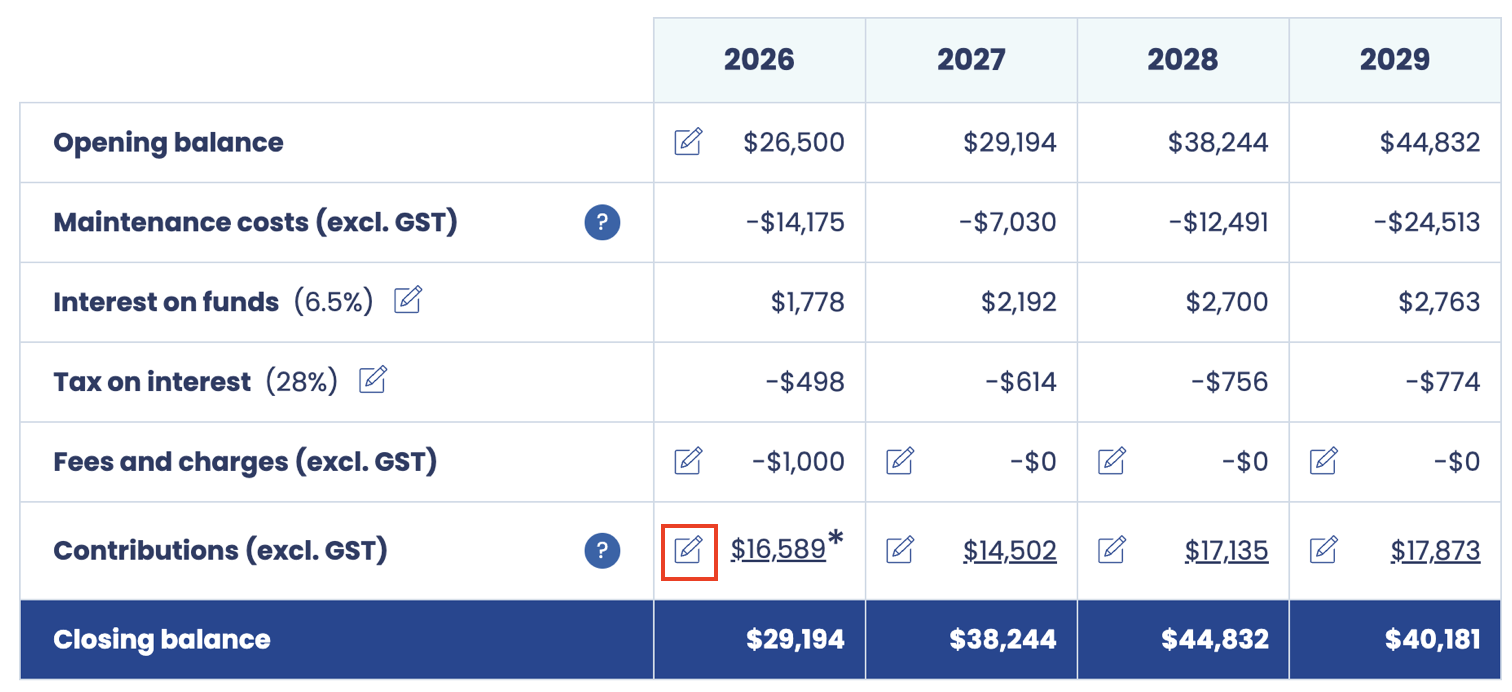
Click the edit button in the cell for the year you want to adjust.
-
Enter the desired contribution adjustment amount.
-
The system will recalculate the closing balance for the year using your adjusted contribution.
Why you might adjust contributions
You may want to manually adjust contributions for several reasons:
-
Cashflow considerations
-
If contributions are unusually high for a particular year, you may want to spread the cost over multiple years to avoid asking owners for too much at once.
-
-
Fund balance deviations
-
If the fund is higher or lower than expected due to external factors, such as:
-
Inflation being higher or lower than projected
-
Contingency allowance being too low or too high
-
Unexpected maintenance costs or delays
-
-
-
Smoothing contributions
-
To avoid large spikes or dips in contributions across years, you may want to even out the contributions over multiple periods.
-
-
Strategic planning
-
Adjustments can be used to align the maintenance plan with long-term organisational goals, such as preferring a larger buffer in early years or reducing contributions temporarily to free up capital.
-
Key points
-
Adjustments only affect the year you change and the closing balance for that year.
-
Future contributions are not automatically changed unless you adjust them separately.
-
Manual adjustments are fully compatible with the system’s automatic calculations.
Example
| Year | Accruals | Net Interest | Fees | Contribution Adjustments | Contributions |
|---|---|---|---|---|---|
| 2025 | $5,000 | $734 | $50 | -$500 | $3,815 |
-
In this example, the system initially calculated contributions of $4,315.
-
The user reduced the contribution by $500 to account for cashflow constraints.
-
The closing balance and subsequent years’ calculations will reflect this adjustment.
Change Opening balance
The Opening Balance for a year represents the amount of money available in your maintenance fund at the start of the financial year.
Sometimes the forecasted opening balance in the plan may differ from the actual balance in the fund. This setting allows you to update it to reflect reality.
How to change the opening balance
-
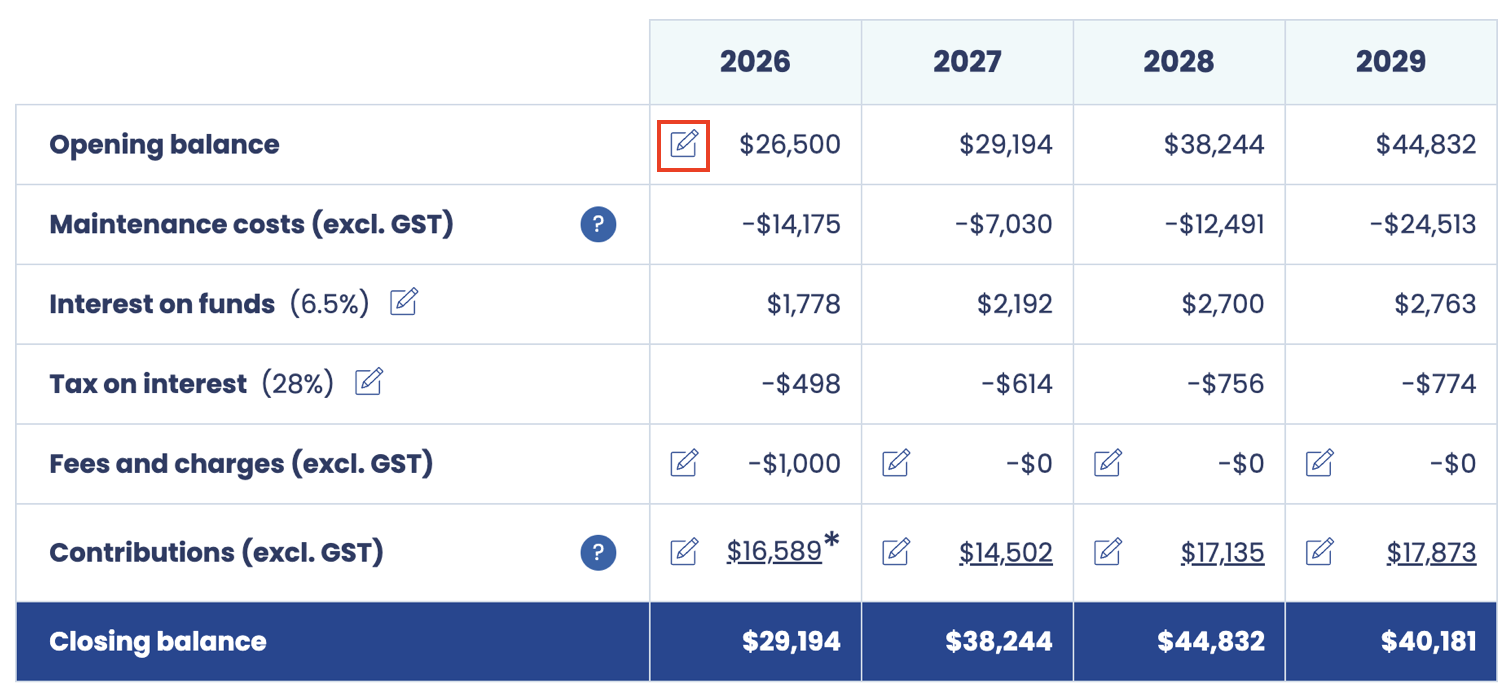
Click the edit button in the first Opening Balance cell.
-
Enter the actual opening balance.
-
The system will automatically recalculate interest, contributions, and closing balances for that year and subsequent years.
Why you might change the opening balance
Updating the opening balance is useful in several situations:
-
Actual fund differs from forecast
-
If the fund received more or less than expected due to early contributions, unexpected expenses, or other financial events.
-
-
Corrections or adjustments
-
To correct errors from the previous year or to account for late transactions not included in the plan.
-
-
Aligning with audited figures
-
When preparing for reporting or approval, you may want the plan to match the official audited balance.
-
Key points
-
Changing the opening balance does not alter past approved years — it only affects the selected year and all subsequent calculations.
-
This ensures that contributions, interest, and closing balances are calculated from the correct starting point.
-
It is especially useful for keeping the plan accurate over multiple years, reflecting the real state of the fund.
Example
| Year | Opening Balance |
|---|---|
| Forecasted | $50,000 |
| Actual | $52,000 |
-
Updating the opening balance to $52,000 ensures that interest, contributions, and closing balances for 2025 and beyond are calculated accurately.
-
This adjustment keeps your maintenance plan aligned with reality.