Documents
Find out how to upload, store, and manage important files such as invoices, certificates, and reports in one place.
Overview
The Documents page allows you to upload, store, and organise important files related to your building’s maintenance and management.
You can upload documents in a variety of formats, including Word, PDF, and Excel files.
This centralised library helps ensure all key documents are easy to find and accessible to everyone involved in the management process.
Uploading documents
-
Click the Add Document button.
-
Choose a file from your computer (e.g. Word, PDF, Excel).
-
Select the appropriate category from the list.
-
Once uploaded, the document will appear under its category, where it can be viewed or downloaded later.
Note: Documents uploaded via the Work Tracker feature are automatically added here as well, making it easy to access all related documents in one place.
For more details: Create a document
Document categories
Documents are organised by category to find documents easily:
-
Governance Compliance – policies, procedures, and regulatory documents
-
Financials Budgets – financial statements, budgets, and forecasts
-
Meetings Communications – minutes, agendas, and correspondence with stakeholders
-
Maintenance Repairs – maintenance records, repair logs, and service reports
-
Contracts Suppliers – supplier agreements, contractor details, and service contracts
-
Insurance Risk – insurance policies, certificates, and risk assessments
-
Building Services Operations – operational manuals, servicing schedules, and maintenance plans
-
Residents Tenancy – tenancy agreements, communications, and resident notices
-
Projects Renovations – renovation plans, project proposals, and progress reports
-
Legal Disputes – legal correspondence, tribunal records, and dispute resolutions
Key features
-
Secure storage: all documents are safely stored within the platform.
-
Easy access: quickly view or download files when needed.
-
Organised structure: every document is grouped under a clear category.
-
Consistent updates: you can replace or remove outdated documents to keep records current.
Example use cases
-
Upload the latest insurance certificate under Insurance Risk.
-
Store meeting minutes and budget forecasts under Meetings Communications and Financials Budgets.
-
Keep contractor agreements and maintenance logs up to date under Contracts Suppliers and Maintenance Repairs.
Add a document
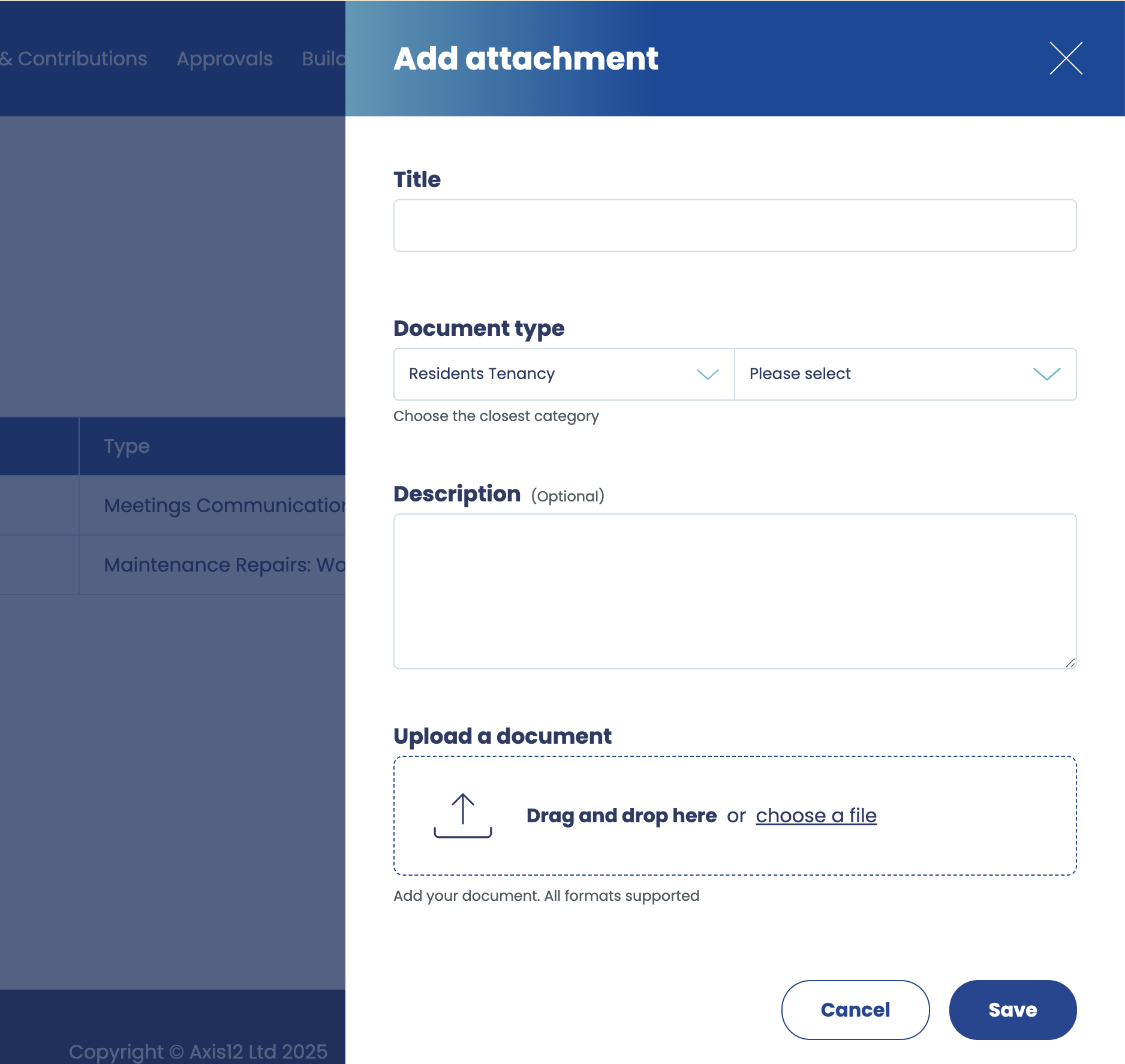
The Add a Document side panel allows you to add new documents to your building’s document library.
Each document is categorised and stored so it can be easily accessed by all authorised users.
Information required
When creating a document, you are asked to provide the following information:
-
Document Title
-
A clear, descriptive name for your document.
-
Example: “Roof Inspection Report 2025”
-
-
Document Type
-
Select the category that best describes the document from the following options:
-
Governance Compliance
-
Financials Budgets
-
Meetings Communications
-
Maintenance Repairs
-
Contracts Suppliers
-
Insurance Risk
-
Building Services Operations
-
Residents Tenancy
-
Projects Renovations
-
Legal Disputes
-
-
-
Description (optional)
-
A short summary of the document’s contents.
-
Example: “Summary of the annual roof inspection, including findings and recommendations.”
-
Useful for quickly understanding the purpose of the document without opening it.
-
-
File Upload
-
Upload the document from your computer. Supported formats include:
-
Word (.docx)
-
PDF (.pdf)
-
Excel (.xlsx)
-
-
Key points
-
The document will be automatically added to the Documents page under the selected category.
-
Documents uploaded via Work Tracker also appear in this library.
-
The optional description helps users understand the content at a glance.
-
All uploaded documents are securely stored and can be viewed or downloaded by authorised users.